Search
Figure
Displays a responsive image with legend and credit.
Example 1
Markdown usage
{{< figure src="https://res.cloudinary.com/uncinq/image/upload/v1758204688/test_pfae0v.jpg" alt="" legend="Lorem ipsum" credit="Unsplash" >}}
HTML rendered
<figure>
  <picture>
    <source srcset="" type="image/webp" media="(min-width: 577px)" />
    <source srcset="" type="image/webp" media="(max-width: 576px)" />
    <source srcset="" type="image/jpg" media="(max-width: 576px)" />
    <img src="https://res.cloudinary.com/uncinq/image/upload/v1758204688/test_pfae0v.jpg" alt="" width="" loading="lazy" height="" decoding="async" />
  </picture>
  <figcaption>
    <p>Lorem ipsum</p>
    <p class="credit">Unsplash</p>
  </figcaption>
</figure>
Visual renderer

Lorem ipsum
Unsplash
Example 2
Markdown usage
{{< figure src="https://res.cloudinary.com/uncinq/image/upload/v1758126305/screenshot-hugolify-decapcms-home_ynatqv.png" alt="Screensot of Hugolify admin with Decap CMS" legend="Screenshot" screenshot="true" >}}
HTML rendered
<div class="screenshot">
  <span></span>
  <figure>
    <picture>
      <source srcset="" type="image/webp" media="(min-width: 577px)" />
      <source srcset="" type="image/webp" media="(max-width: 576px)" />
      <source srcset="" type="image/jpg" media="(max-width: 576px)" />
      <img src="https://res.cloudinary.com/uncinq/image/upload/v1758126305/screenshot-hugolify-decapcms-home_ynatqv.png" alt="Screensot of Hugolify admin with Decap CMS" width="" loading="lazy" height="" decoding="async" />
    </picture>
    <figcaption>
      <p>Screenshot</p>
    </figcaption>
  </figure>
</div>
Visual renderer
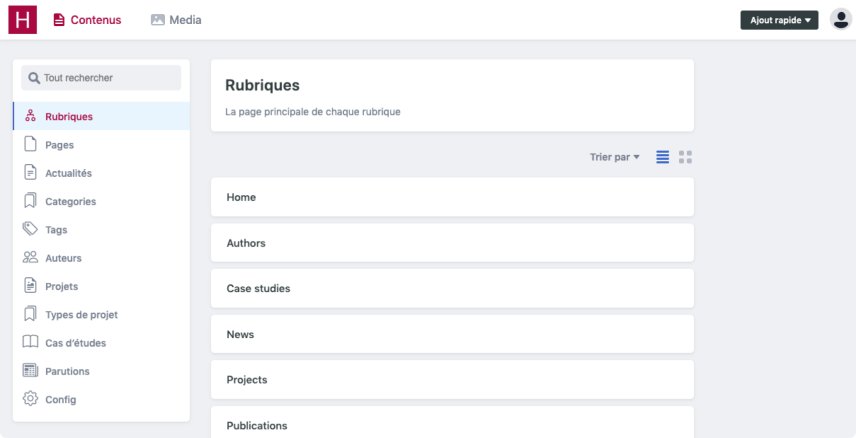
Screenshot
Datas
src: "" # image
alt: "" # string
legend: "" # string (or caption)
credit: "" # markdown
screenshot: false # boolean (set true if you want add a fake browser around your picture and linear filter compression)
class: "" # string
link: "" # string
target: "" # string
rel: "" # string
CMS availability
Hugolify Admin
- Hugolify Admin
- CloudCannon Available Since v1.0.0
- Decap CMS Available
- Netlify CMS Available
- Pages CMS Not available
- Sveltia CMS Available Since v1.0.0
- Tina CMS Not available
Old repositories
- Hugolify Decap CMS Deprecated Available
- Hugolify Netlify CMS Deprecated Available
- Hugolify Sveltia CMS Deprecated Not available